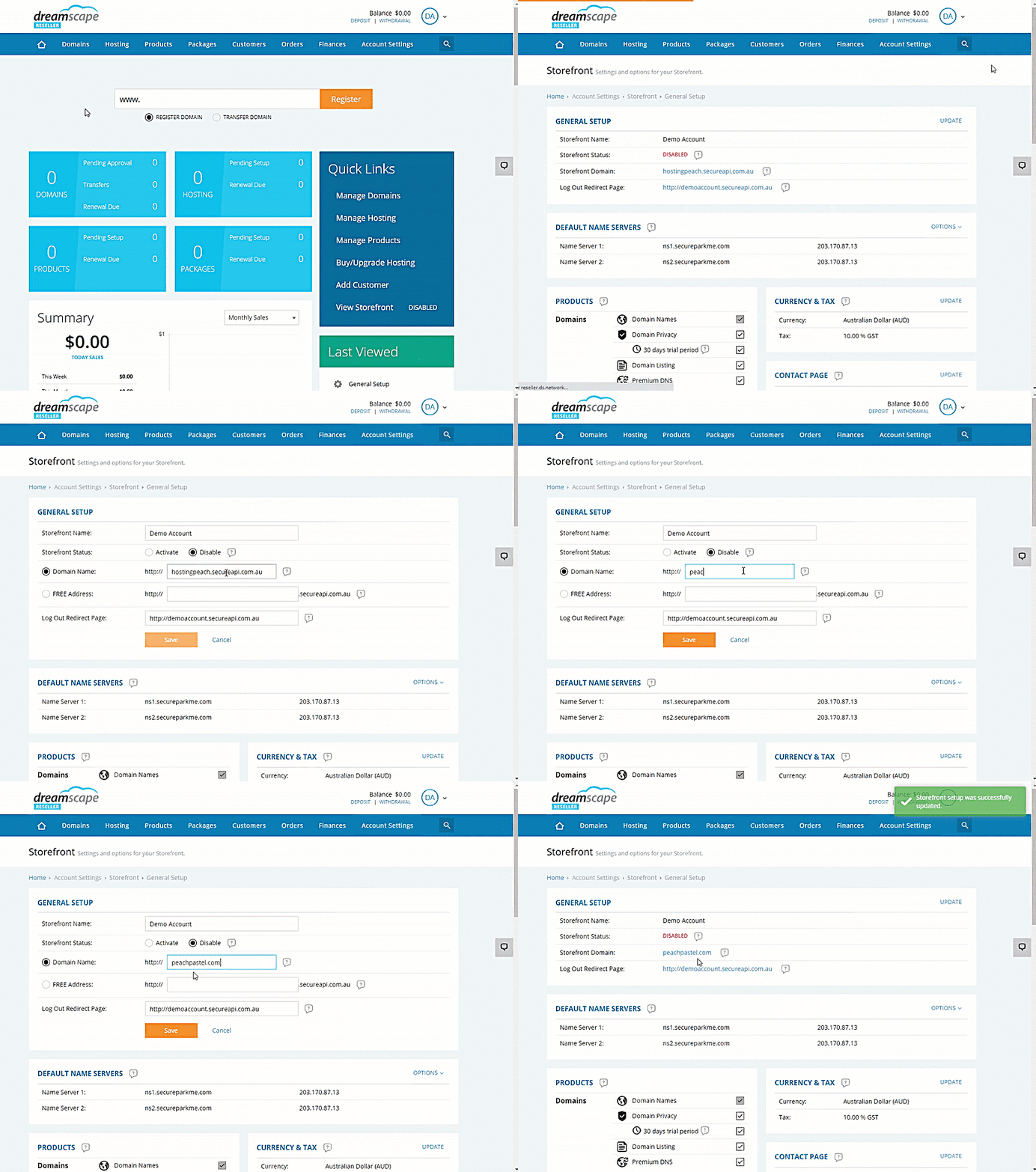
Update the Storefront’s Domain Name
Every reseller account includes a white-labeled storefront that we have built for you to sell all domain names and products we offer. This storefront must be hosted on your own domain name and will include a free SSL certificate for 1 year.
In this section, you can also enable/disable your storefront website, and set the log out URL from your clients members area.
Update the Storefront to use your own Domain Name
- Log in to the Reseller Console.
- Hover your mouse over to Account Settings.
- Select Storefront.
- Click the General Setup.
- Click the Update option next to the General Setup section.
- Type in the domain you want to use in the text field adjacent to Domain Name.
- Save the Changes.
IMPORTANT.
After assigning the domain name in the storefront, you will need to login to the DNS manager for the domain name and update the following DNS records:
A record (naked domain)
IP address: 27.124.125.189
CNAME Record (WWW or sub-domain)
Value: reseller-storefront.ds.network
Please contact your DNS/domain name provider for help with setting this record, or contact us and we will be happy to guide you.